Warranty and feedback process
The feedback and warranty processes will help the RAS team to improve communication throughout the program and the management of nationwide warranty cases. This article will help you to understand how you will be notified of warranty cases and feedback relating to your members.
Who can submit a warranty case or feedback form?
- A warranty case should be submitted using the warranty form when a member assesses an issue, and they suspect it might be related to previous work completed by another member.
- Members can submit feedback using the feedback form in RASNet.
- Customers can submit feedback using the customer contact form.
- Repco stores can submit feedback on behalf of their customers or themselves using the Repco auto parts contact form.
Who will receive a notification?
The feedback and warranty processes features notification emails that are sent out to inform people that a new communication has taken place.
Depending on the communication type, the following people will receive notifications provided they have subscribed to the relevant support category:
- Customer care centre form
- Admins
- Annemaree
- BDS for the member
- Coach for the member
- Management
- RM for the member
- RASNet contact us form
- Admins
- Coach for the member
- Management
- RM for the member
- RASNet warranty form
- Admins
- BDS for the original member
- BDS for the warranty member
- Coach for the original member
- Coach for the warranty member
- Management
- Member
- RM for the original member
- RM for the warranty member
- Repco contact form
- Admins
- BDS for the member
- Coach for the member
- Management
- RM for the member
Keep reading for a guide on how to opt-in to particular communication types.
Steps to manage warranties and feedback
- When a warranty is created, a conversation will be created in Help Scout. This will be emailed to the members involved in the warranty, the relevant BDM for the involved members and any RMs that have selected to be notified.
- When any of the above forms are submitted, a conversation will be created in Help Scout. If there is a member involved, this will be sent to the member's BDM and any RMs that have selected to be notified.
- RMs and coaches have the ability to choose which forms they want to be notified of; this is always in direct relationship with their own members. Therefore, you will only ever receive updates about members you work with.
- If no member is involved, the conversation will be sent only to those in Admin roles who have selected the relevant category in MMS. For example, the marketing team will choose to be notified of RAS merchandise and Google and Facebook marketing feedback.
- To set this up, follow the following steps;
- Log in to MMS
- Navigate to your user profile (you can follow these steps for more information on managing your own preferences)
- Scroll to the feedback and warranties section (you will not see this if your only role is BDM)
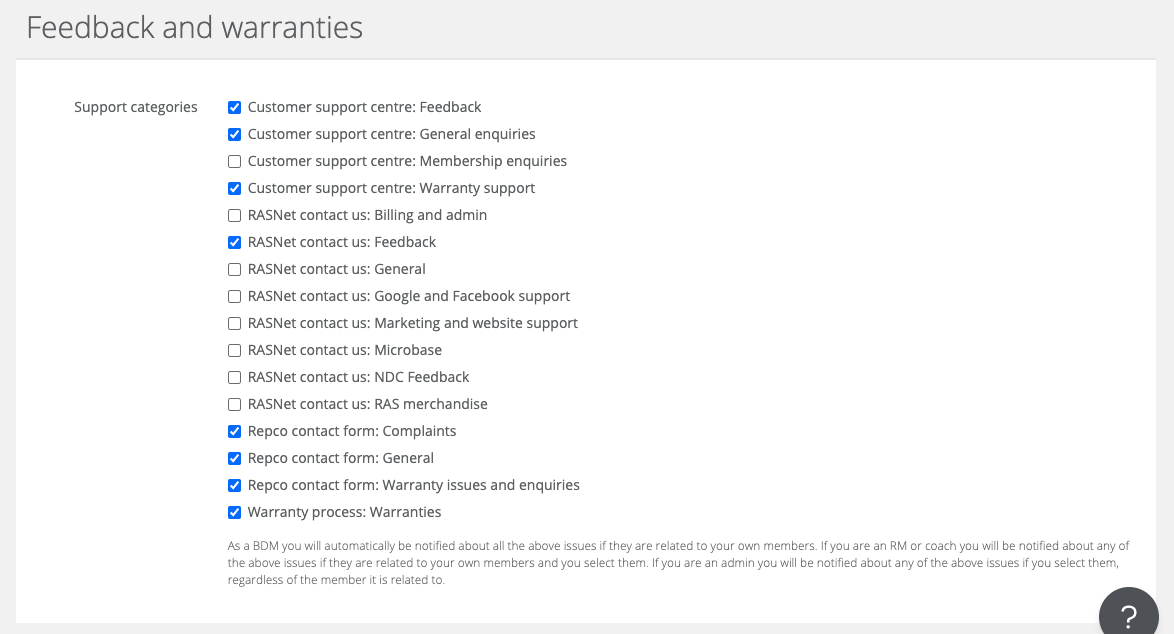
- Select the forms and issue types you would like to be notified of.
Please note: BDMs cannot edit this selection, they will be notified of all support categories if their members are involved.