Member job advertisements
This article will discuss the ability that members have to create and manage job advertisements which are automatically displayed on www.repcoservice.com and their own websites.
Job advertisements are intended short advertisements for a job, which links to careers website (such as Seek or LinkedIn) which contain all information and the ability to apply for the position.
Job advertisements are not intended to replace a Seek or LinkedIn advertisement. They have no room to capture a large amount of data such as job description and/or position description - detailed information should be provided on the linked careers website.
Goals
- Understand the lifecycle of job advertisements.
- Managing job advertisements in RASNet.
- Review job advertisements in MMS.
- Review job advertisements on www.repcoservice.com.
The lifecycle of a job advertisement
Job advertisements will under usual circumstances, be created by members using RASNet.
Job advertisements will automatically appear on www.repcoservice.com and the members own website until either the job is deleted, or the advertisement expires. When a job advertisement is created, the expiry date is automatically set to 6 weeks into the future.
When a job advertisements's expiry date is reached the job advertisement will no longer display on any website. On this date, an email notification will be sent to the member informing them their job will no longer be visible. The member can create a new advertisement in RASNet if they still wish to advertise a position.
RMs, BDS and other Repco staff can review all job advertisements by using MMS.
Managing job advertisements in RASNet
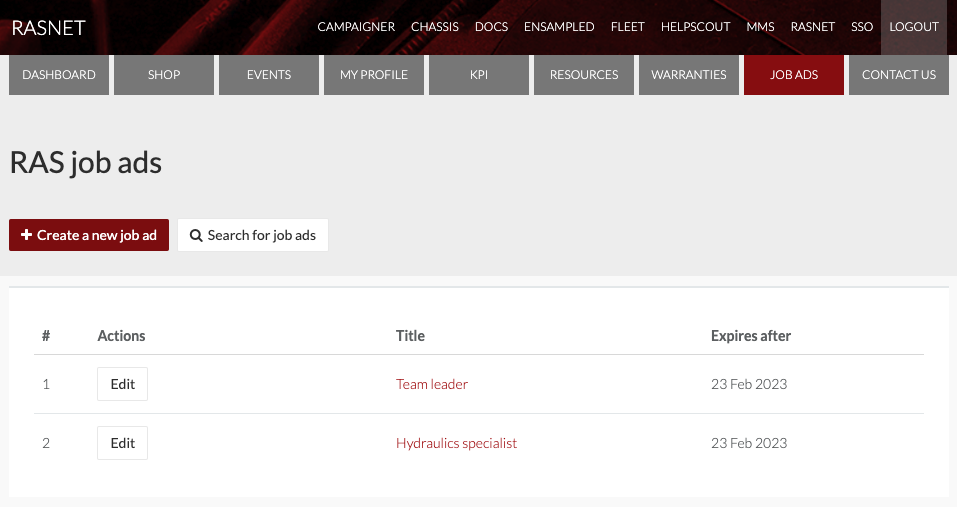
A member will create, edit and delete job advertisements in RASNet. To do so, the member should click on the Job Ads navigation item:

They'll be shown all job ads that the member has created. They'll have the ability to create new jobs ads, and edit and delete existing job ads.
Review job advertisements in MMS
Job advertisements can also be reviewed by RMs, BDS and other Repco staff within MMS. To do so:
Within MMS users can:
- Create job ads on behalf of a member.
- Edit and delete existing job ads.
- Filter job ads by date created, expires after and member.
Review job advertisements on www.repcoservice.com
Job advertisements are automatically displayed on www.repcoservice.com. Once a job has expired, it will no longer appear in the list.
Jobs are sorted by expiry date with jobs that are expiring appearing at the top of the list. No preference or sorting takes place.
You can filter the job advertisments by state, to help potential employees find something within a particular region.